
This open source VOD pipeline combines modular web services to automatically transform uploaded videos into streamable packages with AI-generated subtitles. Built on Eyevinn Open Source Cloud, it offers production-ready automation without vendor lock-in — deploy as-is or fork for custom needs.
With open web services based on open source in Eyevinn Open Source Cloud you can build your own VOD Content Processing pipeline including transcoding, automatic subtitling and creation of packages for on-demand streaming.
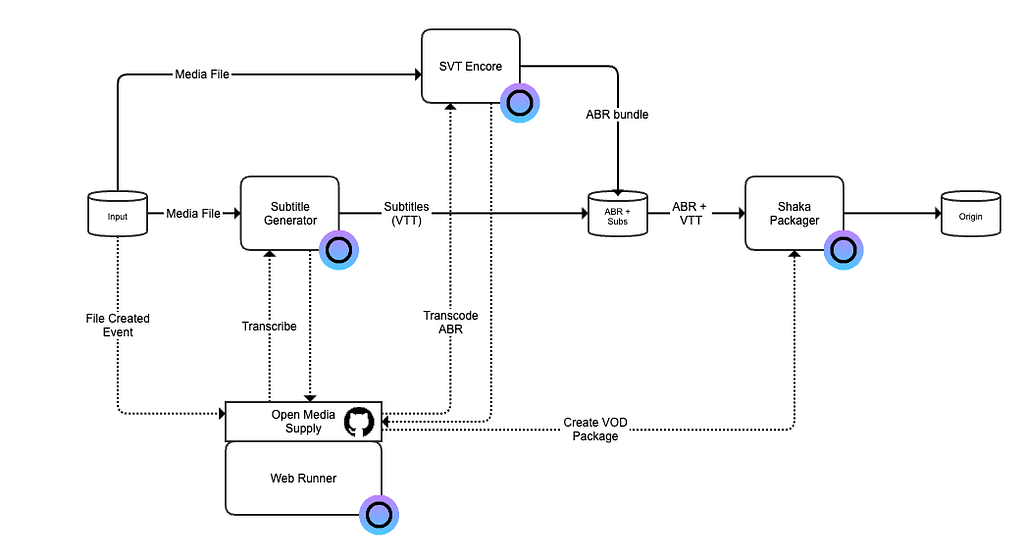
The open source media supply orchestration bring the open web services for transcoding, automatic subtitling and packaging together and you can either deploy it as it is, or deploy your own fork of it with the modifications you need. This solution features:
- Automatic generation of subtitles.
- Transcoding and creating VOD package for streaming in HLS and MPEG-DASH.
- Automated process triggered when a file is uploaded to a bucket and result stored in another bucket.
The following open web services are used in this solution:
- MinIO Server — providing storage buckets.
- SVT Encore — providing the video transcoding functionality.
- Subtitle Generator — uses OpenAI Whisper model for transcribing the audio to text for automated captioning of the content.
- Shaka Packager — bundles the transcoded video files and the subtitle file in a VOD package ready for streaming.
- Web Runner — for deployment of the media supply orchestrator.
- Application Config Service — for managing the configuration of the media supply orchestrator.
- Valkey — for storing configuration values in a database.
All open web services are based on open source and can be deployed to your own cloud infrastructure if you later decide to do so.
Building the pipeline
This video tutorial demonstrates how you build this VOD content processing pipeline using the Eyevinn Open Source Cloud web console.

First step is to create the MinIO server and the three buckets we will use: “input”, “abrsubs” and “origin”. The MinIO service getting started guide instructs you how to work with the MinIO service in Eyevinn Open Source Cloud.
Next step is to create a Subtitle Generator service. For this service you need to have an OpenAI account and OpenAI API key as it uses the OpenAI whisper-1 model for the transcription. Configure the Subtitle Generator service to have access to the buckets on the MinIO server you created in the first step.
Third step is to create the SVT Encoder for transcoding and creating the different video variants needed for seamless streaming over internet. Configure the transcoder to have access to the MinIO server and buckets.
The Shaka Packager service we only need to ensure we have activated it or is included in the subscription plan.
Now we have all the open web services that we will use configured and ready. Next step is to deploy the orchestrator that drives this process forward. What will trigger this process is when a new file with suffix mp4 is created on the input bucket.
Orchestration
For the orchestration of this process we will deploy an open source media supply orchestration project available on GitHub. It is a NodeJS based application that subscribes for file events from the input bucket and sends requests to the Subtitle Generator and SVT Encore video transcoder to start subtitling and transcoding jobs. It provides callback webhooks that the subtitle generator and video transcoder can POST updates to. The orchestration manages the process and dependencies for different tasks.
When a file is uploaded to the input bucket a workflow is started. A subtitling job and transcoding job is started in parallell and when both jobs are completed a VOD packager job is started. When the VOD packager job is completed the package is uploaded to the origin bucket, the file on the input bucket is removed and files on temporary storage bucket are removed.
This is a simple workflow and if you want to extend or modify the orchestration you can create your own fork of the project and contributions to the project are also welcomed.
The orchestrator can be self-hosted outside of Eyevinn Open Source Cloud but if you don’t have your own infrastructure you can deploy this as a Web Runner in Open Source Cloud. You configure the Web Runner to fetch the source code either from this GitHub repository or to your fork of it. The code is then downloaded and run as a Web Runner instance in your team account.
A detailed step-by-step guide to setup this VOD processing pipeline and the orchestration is available in the GitHub repository for the orchestrator.
Conclusion
This open source VOD content processing pipeline demonstrates the power of combining modular web services to create a comprehensive media workflow. By leveraging the Eyevinn Open Source Cloud ecosystem, content creators and distributors can build a production-ready system that automatically transforms uploaded video files into streamable packages complete with AI-generated subtitles — all without vendor lock-in.
The solution’s strength lies in its flexibility and transparency. Each component, from MinIO storage to SVT Encore transcoding and OpenAI Whisper-powered subtitling, operates independently and can be replaced or extended as needs evolve. The orchestration layer ties everything together with a clean workflow that handles parallel processing and dependency management automatically.
Whether you’re a small content creator looking to automate your video processing or an enterprise seeking to reduce reliance on proprietary cloud services, this pipeline provides a solid foundation. You can deploy it as-is for immediate results, fork it for custom modifications, or use it as a blueprint for building your own media supply chain. With all components based on open source software, you maintain full control over your infrastructure and can migrate to your own cloud environment whenever you choose.
The complete setup guide and source code are available on GitHub, making it easy to get started and contribute back to the community that makes solutions like this possible.
Eyevinn Open Source Cloud: www.osaas.io
Join the community on Slack for real-time support and connect with other Open Source Cloud users.