
Most content delivery network (CDN) vendors provide a mechanism to protect the access to the content with signed tokens. The tokens and protection mechanisms are in many cases specific to the CDN vendor and adds a risk for you and your solution to be locked in with one specific vendor.
To address this a standard called Common Access Token (CTA-5007) was developed by the Consumer Technology Association. Common Access Token (or CAT for short) is a simple, extensible, policy-bearing bearer token for content access. Primary use case is to allow content providers an interoperable way to enforce access policies. The token is not limited to this use case and can also be used as an OAUTH bearer token, a URI signing or a general mechanism for conveying delivery policies.
Common Access Token Library
We at Eyevinn have developed and published a beta version of a Javascript NPM library (written in Typescript) to facilitate the adoption of this standard. Currently it support basic claims such as expiration and renewal, URI limiting claim, audience, issuer and replay prevention. It is released under open source and we will continue to add support for more claims (per specification) and we are welcoming code contributions. It is available on our GitHub.
Common Access Token Validator Service
Based on this library we have also developed and open sourced a token validation service. The service provides an endpoint that can be used as an authentication endpoint for a web server proxy before serving the content to the client. This project is also available as an open web service in Open Source Cloud to further reduce the barrier to get started.
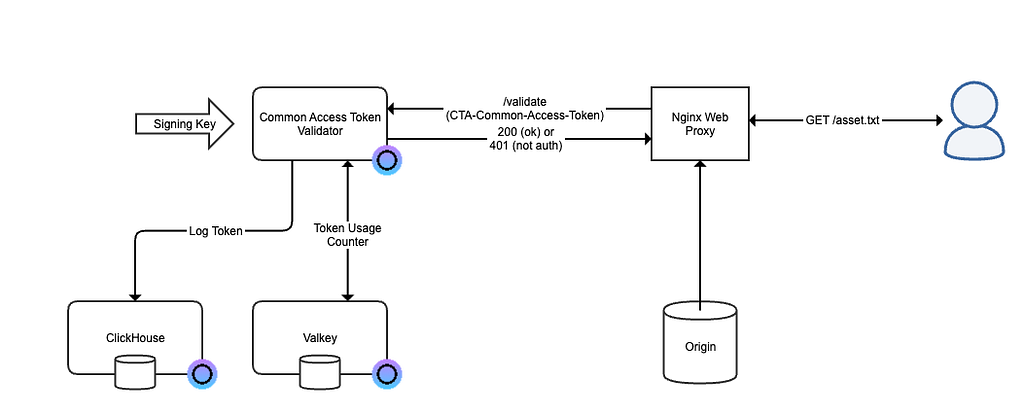
When a user / client request to fetch a file, e.g. asset.txt, it provides a common access token (CAT) in an HTTP header. This token has been generated and given to the client by some mechanism outside of this context. The token contains claims that limit what the user can access. The contents of a token cannot be changed as the token stores a signature that will not match if the contents of the token was changed.
For example it can contain an expiration time (exp) which means that after a specific date and time the user can no longer access the content. In combination with this the renewal (catr) claim instructs the recipient how the token can be renewed. It can specify when it should be renewed and how the new token is delivered to the client.
Another claim is a claim that limits the URI (catu) to which the token can provide access. You can configure the claim to limit to a specific host, port, path, filename, extension or a matching regular expression.
Every token has a unique identifier and one claim (catr) can specify whether a token can be used only once or multiple times.
The specification contains over 20 claims and we will not go through all of them in this post.
Getting Started
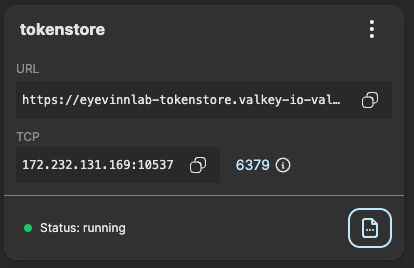
The easiest way to get started is to use the Common Access Token Validation service available in Eyevinn Open Source Cloud. For token count usage we need to first setup a Valkey key-value store that is also available as an open web service. Follow the instructions in the Open Source Cloud documentation on how to set this up.
Then navigate to the Common Access Token Validator service in the Open Source Cloud web console and press the button “Create validator”.
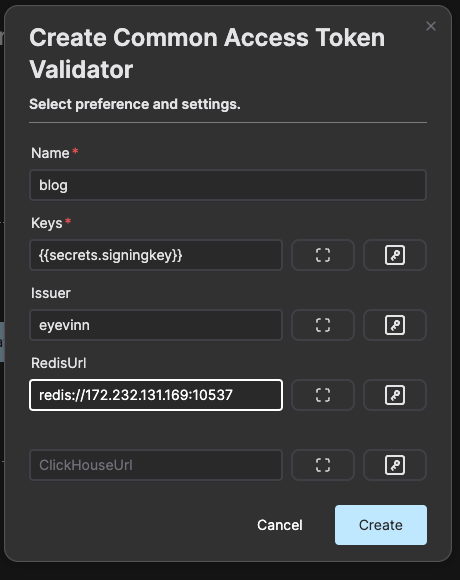
The secret signingkey is a string in the format KEYID:KEYHEX where KEYID is an identifier of the key and KEYHEX is the hexadecimal representation of the key. This is the encryption key that will be used to verify the signature of the token.
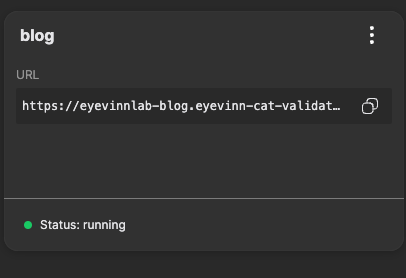
The validation endpoint in our example is https://eyevinnlab-blog.eyevinn-cat-validate.auto.prod.osaas.io/validate
Configuring Nginx web server
Now we have the validation endpoint up and running and we can configure our Nginx web server to use this endpoint to validate that the client has access to the requested resources. Here is an example of an nginx configuration file.
events {
worker_connections 1024;
# worker_processes and worker_connections allows you to calculate maxclients value:
# max_clients = worker_processes * worker_connections
}
http {
server {
listen 80;
  location / {
      auth\_request /\_oauth2\_token\_introspection;
      root /data/www;
      index index.html index.htm;
  }

  location = /\_oauth2\_token\_introspection {
      internal;
      proxy\_method      GET;
      proxy\_pass        https://eyevinnlab-blog.eyevinn-cat-validate.auto.prod.osaas.io/validate;
  }
}
}
This configuration defines that all requests on location / should use the /_oauth2_token_introspection resource for authentication. This resource in turn is an instruction to proxy the request to our validation endpoint using the HTTP method GET . Our validation endpoint will return status code200 when all claims in the token are fulfilled and client is allowed access. Otherwise it will return status code401
We can save this configuration file we call example-nginx.conf and then start nginx using the official Docker image.
% docker run --rm -p 8080:80 \
-v ./example-nginx.conf:/etc/nginx/nginx.conf \
-v /tmp/www:/data/www \
nginx
We can then try this out using curl and providing the common access token in the header to get the file blog_cat_validator.png.
% curl -v -H 'CTA-Common-Access-Token:
http://localhost:8080/blog_cat_validator.png > /dev/null
> GET /blog_cat_validator.png HTTP/1.1
> Host: localhost:8080
> User-Agent: curl/8.7.1
> Accept: */*
> CTA-Common-Access-Token: 0YRDoQEFoQRMU3ltbWV0cmljMjU2eL5kOTAxMDNhNzAxNjc2NTc5NjU3NjY5NmU2ZTAyNjU2YTZmNmU2MTczMDM2MzZmNmU2NTA0MWE2N2RiMjE3NDA2MWE2N2RiMjEzODE5MDE0M2Q5MDEwM2E0MDAwMjA0Nzc2Mzc0NjEyZDYzNmY2ZDZkNmY2ZTJkNjE2MzYzNjU3MzczMmQ3NDZmNmI2NTZlMDExODc4MDIxODFlMDc1MDNhZWY4ZjIzNmMxMjIzNzJmMThjNGJmNWFjNDYzNDM1WCDr0F1YoZnnTVpCg/fRmVaCfryKZIg0tz+YOMemfgKhdw==
> < HTTP/1.1 200 OK
< Server: nginx/1.27.4
< Date: Wed, 19 Mar 2025 19:55:46 GMT
< Content-Type: text/plain
< Content-Length: 39913
< Last-Modified: Wed, 19 Mar 2025 19:50:27 GMT
< Connection: keep-alive
< ETag: "67db2003-9be9"
< Accept-Ranges: bytes
<
This token was set to expire after one minute so if we shortly try it again we will instead get.
% curl -v -H 'CTA-Common-Access-Token:
http://localhost:8080/blog_cat_validator.png > /dev/null
> GET /blog_cat_validator.png HTTP/1.1
> Host: localhost:8080
> User-Agent: curl/8.7.1
> Accept: */*
> CTA-Common-Access-Token: 0YRDoQEFoQRMU3ltbWV0cmljMjU2eL5kOTAxMDNhNzAxNjc2NTc5NjU3NjY5NmU2ZTAyNjU2YTZmNmU2MTczMDM2MzZmNmU2NTA0MWE2N2RiMjE3NDA2MWE2N2RiMjEzODE5MDE0M2Q5MDEwM2E0MDAwMjA0Nzc2Mzc0NjEyZDYzNmY2ZDZkNmY2ZTJkNjE2MzYzNjU3MzczMmQ3NDZmNmI2NTZlMDExODc4MDIxODFlMDc1MDNhZWY4ZjIzNmMxMjIzNzJmMThjNGJmNWFjNDYzNDM1WCDr0F1YoZnnTVpCg/fRmVaCfryKZIg0tz+YOMemfgKhdw==
>
< HTTP/1.1 401 Unauthorized
< Server: nginx/1.27.4
< Date: Wed, 19 Mar 2025 19:58:31 GMT
< Content-Type: text/html
< Content-Length: 179
< Connection: keep-alive
<
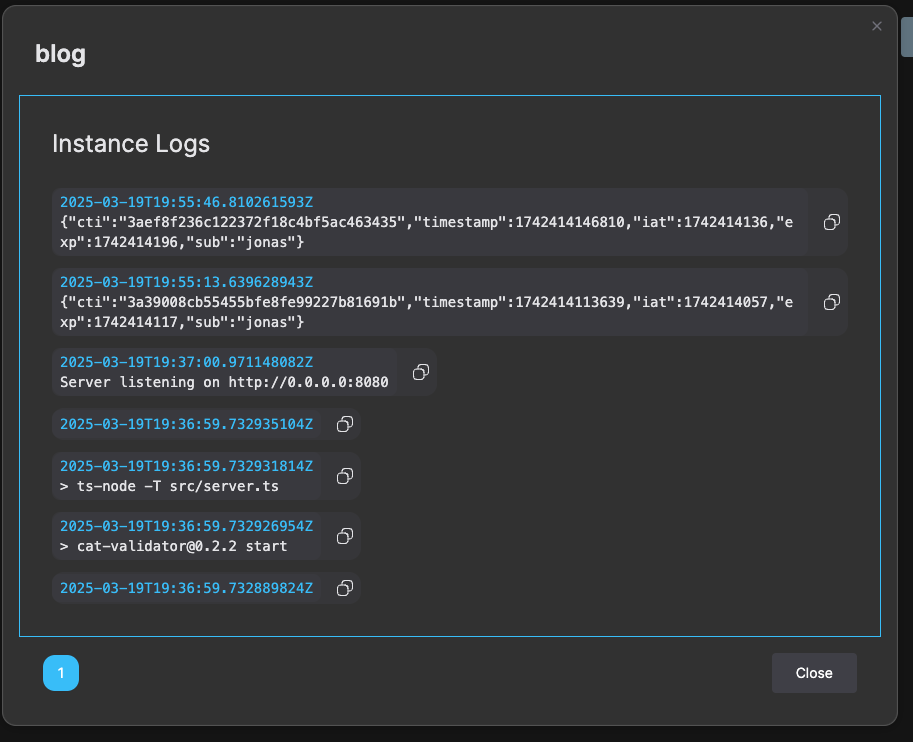
We can then in the logs of the validator also see the authorized usage of the token.
Conclusion
Common Access Token offers a standardized way of controlling access to content who ever is responsible for the delivery of the content. Content Delivery Network providers that offers support for Common Access Token today is only Akamai to our best of knowledge as this standard is relatively new and we hope for a wider adoption. Our open source library and open web service is our contribution to facilitate this adoption.
Join our Slack workspace for Open Source Cloud real-time support and to connect with other users.
Let us know in the comments below if you are a vendor that supports Common Access Token today and we will update this blog post.